SMS Notification Consent
Last updated: January 25, 2026
Overview
Pingura is an uptime monitoring service that helps businesses track the availability of their websites, servers, and infrastructure. We offer optional SMS notifications to alert users about critical system events. This page documents our SMS consent collection process for transparency and regulatory compliance.
View screenshot of in-app consent form →
How Users Opt-In
Pingura users may voluntarily opt-in to receive SMS notifications through the following process:
- Navigate to Profile Settings: After logging into their account at
app.pingura.com, users go to Profile → Phone Number for SMS Notifications. - Enter Phone Number: Users enter their mobile phone number in the provided field.
- Explicit Consent Checkbox: Users must check a required consent checkbox agreeing to receive SMS notifications before proceeding.
- Verification: Users receive a one-time verification code via SMS and must enter this code to confirm ownership of the phone number.
- Activation: SMS notifications are only sent after successful verification.
Consent Disclosure
Before opting in, users see the following disclosure and must check a consent checkbox:
"I agree to receive SMS notifications from Pingura, including system outage alerts, recovery notifications, infrastructure status updates, and one-time verification codes. Message frequency varies. Message and data rates may apply. Reply STOP to unsubscribe or HELP for help."
Types of Messages
Users who opt-in may receive the following types of non-marketing, service-related SMS messages:
- One-time verification codes – To confirm phone number ownership
- Monitor down alerts – When a monitored website or service becomes unavailable
- Recovery notifications – When a monitored service comes back online
- Heartbeat missed alerts – When an expected check-in from a job or service is not received
- Incident notifications – Updates about ongoing infrastructure incidents
Message Frequency
Message frequency varies. Most users receive only a few messages per month; however, during active incidents, message frequency may temporarily increase.
How to Opt-Out
Users can opt out of SMS notifications at any time using either method:
- Reply STOP: Text STOP to any message received from Pingura
- Account Settings: Remove the phone number from Profile settings at
app.pingura.com
After opting out, users will receive a confirmation message and no further SMS messages will be sent.
Getting Help
For assistance with SMS notifications, users can:
- Reply HELP: Text HELP to any message for assistance
- Email Support: Contact support@pingura.com
Screenshot of In-App Consent Form
The following screenshot shows the SMS notification opt-in form as displayed in the Pingura profile settings:
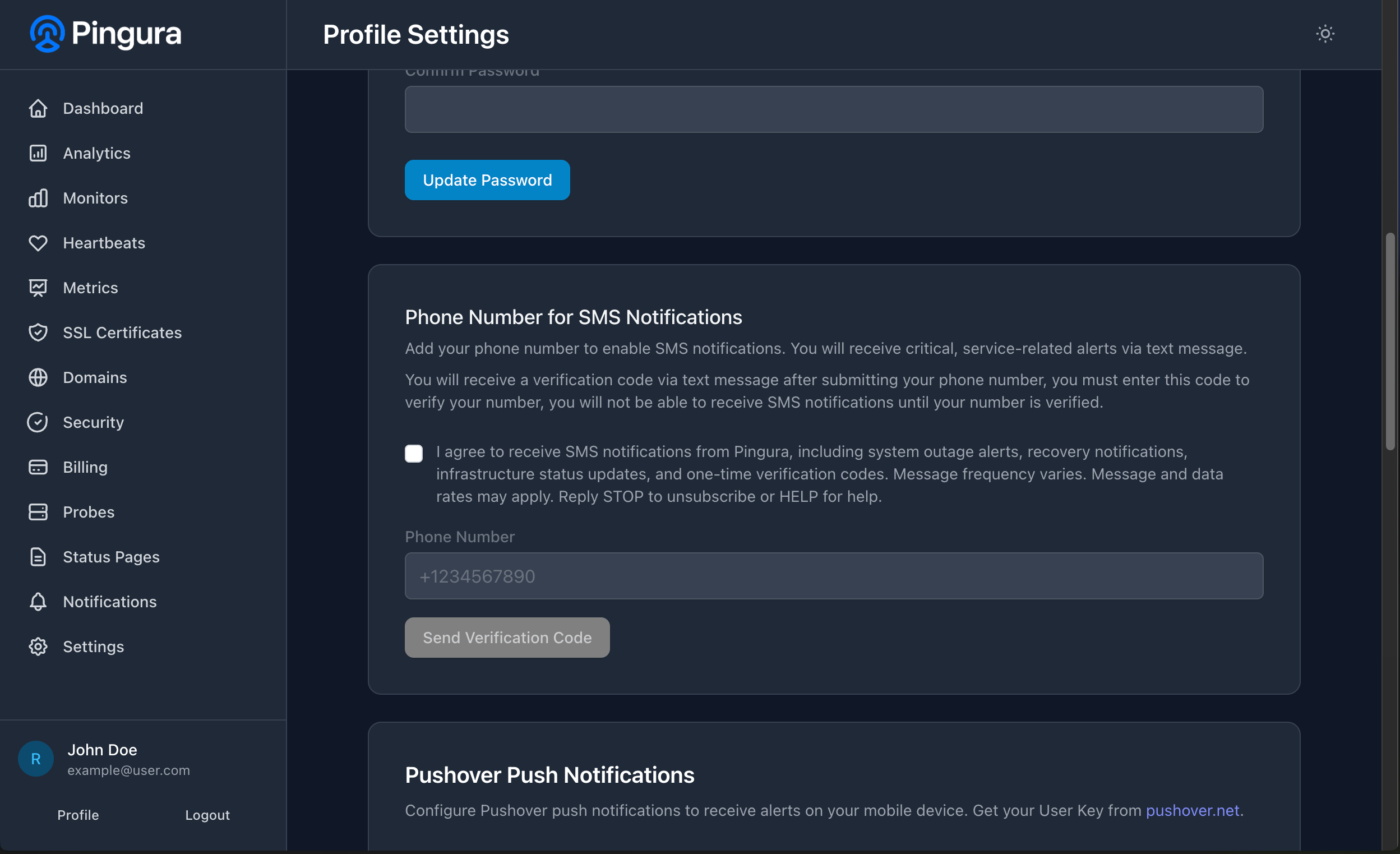
The consent checkbox must be checked before users can submit their phone number for verification.
Carrier Information
Message and data rates may apply depending on your mobile carrier and plan. Pingura is not responsible for any charges from your carrier related to SMS messages. For carrier-specific questions, please contact your mobile provider.
Privacy
Phone numbers are stored securely and used solely for sending service-related SMS notifications. We do not share, sell, or rent phone numbers to third parties for marketing purposes. For more information, please review our Privacy Policy.
Questions about this policy? Contact us at support@pingura.com